


Ahhh, the great automation debate: Process Builder versus Workflow. Both are powerful tools, both offering countless benefits. More than likely there is at least one of each kind of automation enabled in your org right now. But which one should you be using for that next automation request?
Based on Trailhead exercises, you should be using Process Builder. I have yet to take a trail that instructs Trailblazers to use Workflow. Just a few weeks ago I was participating in a Circles of Success at a user group meeting where we were discussing automation, and the bulk of the conversation was spent talking about Process Builder (and very little about best practices related to these tools).
Perhaps I’m old enough to still have quite a soft spot in my heart for Workflow. After all, I’ve been in the Salesforce community for 10 years now and Workflow used to be the only way a non-technical Admin could automate anything. Has Workflow fallen out of favor? Let’s find out!
Process Builder
This tool is definitely the new kid on the block. With all of its flashy Lightning Experience interface and all of the whiz-bang actions it can do (can I get a “holla” for the record create action?), it’s easy to be lured in by Process Builder’s siren call.
Process Builder is built atop the Flow (aka Visual Flow) platform but requires less technical ability than Flow. Because of the underlying architecture, it’s powerful too. Here are just a few things you can do with Process Builder.
- Leverage cross-object entry criteria
- Evaluate multiple entry criteria nodes in a single process builder (instead of say, using 80 Workflows)
- Create new records
- Create Chatter posts
- Call Flows
- Call Apex
- Submit a record for approval
With all of those benefits, Process Builder is a home run, right? Well, not so fast. There are some drawbacks to consider. For example, Process Builder is not bulkified in a way that allows for high volume transactions to be done en mass without significantly reducing the batch size. By reducing the batch size, I mean down to a batch of 10 records in some cases.
I’ve also experienced issues in highly customized orgs with lots of code and workflows where Process Builder doesn’t play nice. It has fired at the wrong time and reverted fields to old values; caused errors in bulk updates being done via code; and can be difficult to troubleshoot.
So, there are the traditional pros and cons. But what about Workflow?
Workflow
Workflow is the tried and true method that many of us are familiar with for automating business processes. It’s a workhorse. Based on the filter criteria, you can do things like update a record, or send an email. It’s simple and intuitive. It’s a minimalists dream!
True, the list of capabilities is much less impressive:
- Single object entry criteria (can only use data points found on the named object for criteria)
- New Email Alert
- New Task
- New Field Update
- New Outbound Action
Workflow is properly bulkified, meaning that Admins can run mass updates to hundreds, thousands, or millions of records and Workflows will fire and process their actions every time without fail.
But, like with Process Builder, there are downsides. Specifically, the reduced capabilities means that you’ll need to get creative with your field criteria by creating formula fields to pull related data to the object the Workflow is built on (this is a hack to cross-object entry criteria). One Workflow can contain only one set of entry criteria so you’ll need to create more Workflows to accomplish the same updates that one Process Builder can accommodate.
So, if you’re still following along, you’re probably noticing that there are major pluses and minuses to both. Which one will win this showdown?
The Verdict
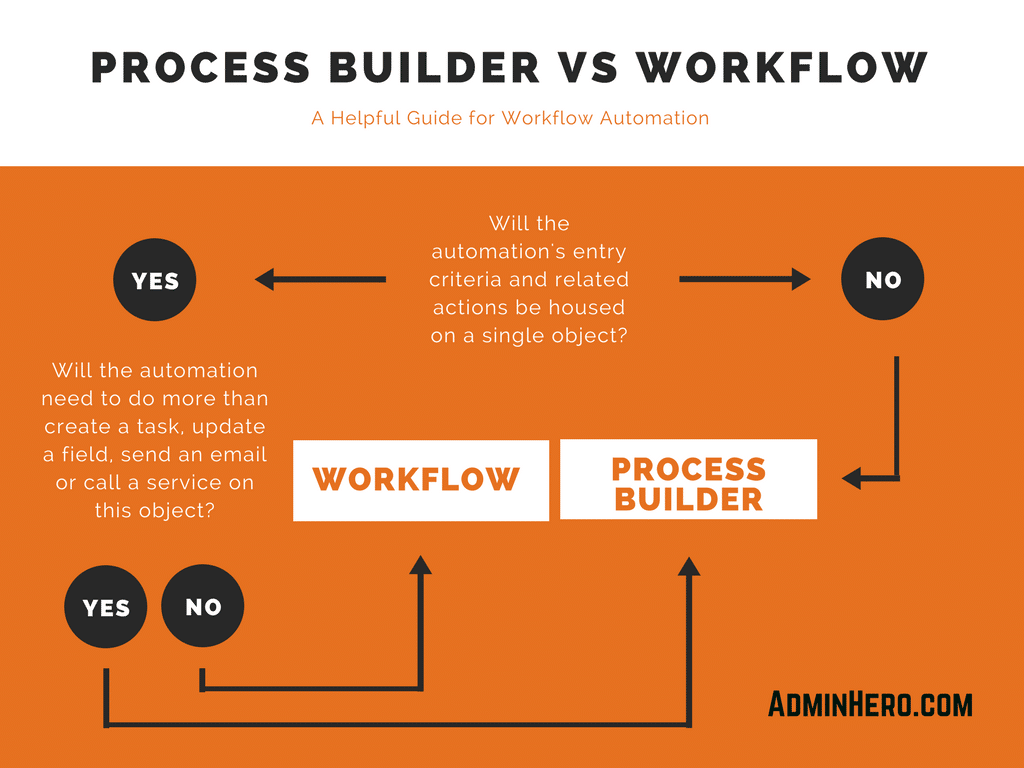
The truth is that both tools are extremely powerful and terribly useful. The winner will be situational, meaning that you shouldn’t use one over the other exclusively, you should use both in your org. Evaluate the requirements, and determine the best tool for the job. Process Builder shouldn’t always be the tool of choice.
It boils down to this: if the requirements allow you to use Workflows, use Workflows. If not, then move to Process Builder. You’ll find far less issues with your business processes and related code, as well as data updates by first evaluating and using Workflow whenever possible.
Admin Hero Trailmix

If you’re new to process automation, don’t worry! Trailhead has you covered. Learn all about Workflow and Process Builder by getting hands-on with Trailhead and this custom Admin Hero – Automation Showdown Trailmix!
Have a different opinion? Leave a comment below!


 Admin Hero
Leave a reply to Brent Downey Cancel reply