
PREFACE: This post is part of the Zero to Hero series.
“Wait a second, databases? I thought we were going to talk about Salesforce!”
Well, Salesforce is actually a gorgeous and easy to use database which is why we need to discuss it. Understanding the basics of a database and how Salesforce works as a database will help you visualize solutions, understand system limitations and allow you to better visualize the data in Salesforce. Trust me. This is an important foundational part of the puzzle.
The beauty is that you don’t need to know much. We are going to focus on the high-level functionality and terminology.
Database Basics
A database is simply a way to collect and organize information in a series of rows and columns. An easy to understand example of this is Excel. If you have used Excel (and who hasn’t), you have used a database. Easy enough, right?
Take a look at this simple database model.

This table is a specific collection of data points organized by rows and columns. In database terminology, a table holds the data points that represent a theme. In this example, the theme is called, “Position Details.”
Salesforce changes the terminology a little bit. Tables in Salesforce are called Objects.
Within the table/object, we have rows and columns. Each row is referred to as a record. Every record contains individual data points that make up the sum of that record. In this example, the Recruiter row is highlighted. If you read the data across the row, we see the data points that are unique to the Recruiter position.
The columns contain a range of data specific to the column name. Salesforce calls columns fields. In the above example, the Education Requirements column is equivalent to a field in Salesforce by the same name. Fields can have different types (which we will cover later on), but each field contains a specific, limited data set. As you read the data in each of the columns, you see a similarity in the data and the relationship to the column or field name.
You can see that in our table, the Education Requirements column/field shows the level of education necessary for this position.
Great! So, that’s it! But Salesforce is more than a standard database. What makes it so powerful is that the database tables can have relationships with one another. It’s a total love fest!
Relational Databases
Here we have our database model again, but this time we have added a field or column called Hiring Manager.
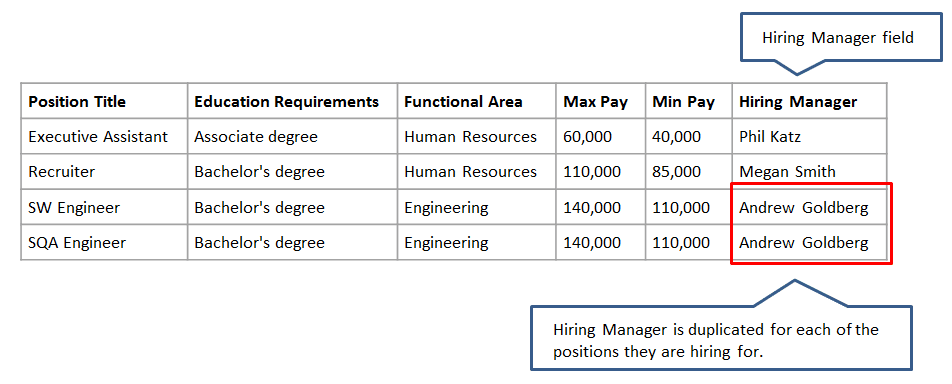
Notice that Andrew Goldberg is listed as the Hiring Manager for two positions. We see Andrew’s name duplicated here because we are still looking at a single database table, and we need a single row for each record. This is normal, and the “duplicate” information on the record is okay – not considered a duplicate because it sits in the Positions table or object.
But what happens if we wanted to see information about Andrew, such as his contact information or department? We need to build a more complex query or report to get access to this information.
Let’s look at a different visualization of a standard database structure:
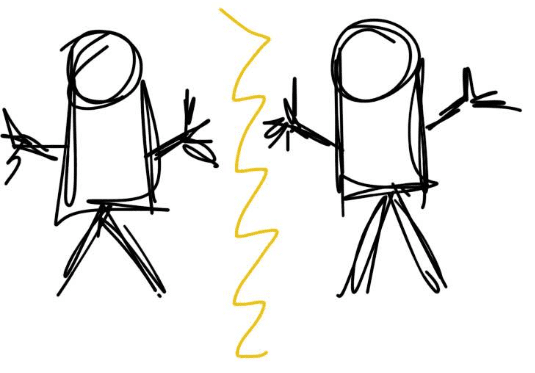
Let’s call the database table on the left “Positions” and the database table on the right will be called “Hiring Manager.” In a typical database structure, these two database tables may share some information (like the name of the Hiring Manager) but because these databases don’t talk to one another, we can’t easily combine the data points from both tables without some complex reports and queries.
Salesforce is a relational database which means that the database tables can be connected. As a result, the tables look more like this:

Salesforce allows us to use particular types of fields (columns) to relate information together. They are called Master-Detail and Lookup relationship fields. We will cover these in more detail in Chapter 2. For now just know that these fields allow us to connect the two database tables together so that we can collect information on both with a simple query. It also makes navigating the data in Salesforce super simple.
In our example, Andrew Goldberg has his record in the Hiring Manager object (table). As long as we have a relationship built in Salesforce between the Position and Hiring Manager tables, we can navigate between the two with just a few clicks.
Congratulations!
You just learned the basics of a database structure. This knowledge will serve as the building block for all of our future Zero to Hero lessons.
Don’t forget to subscribe to Admin Hero and get every weekly post delivered right to your inbox!


Leave a reply to Udayakarthik Cancel reply